Case study · Katachi · the typing state
Iterative Design with an AI Agent: A Visual Case Study
  ▐▛███▜▌
 ▝▜█████▛▘
   ▘▘ ▝▝
 ┌──────┐
 │ >_   │
 │      │
 └┬────┬┘
▄▄██████▄▄
Abstract
What do design, implementation, and iteration look like in an agentic-driven workflow? This page documents 36 iterations of bringing Claudito — a pixelated, four-legged Claude avatar — to life through conversation. Every prompt is quoted as written, next to what it produced, so the record reads as it happened: three ASCII explorations to find a composition, then thirty-six SVG versions in which the legs became tentacles, the keyboard became a real one, and the typing became real text.
Background
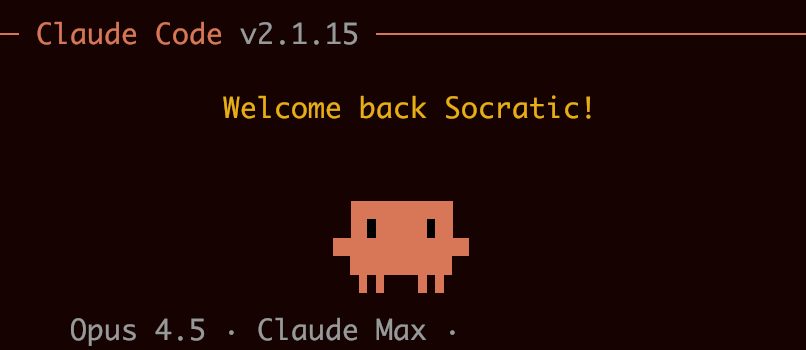
Claudito is the name we gave to the Claude avatar—a pixelated, four-legged character that serves as a visual representation of the AI assistant. The goal of this exercise was to animate Claudito typing on a keyboard.
Prompt by Prompt
ASCII Exploration
Exploration 1: Laptop Concept
Can you come up with an example where claudito is typing on a laptop
Front view
     ▐▛███▜▌
    ▝▜█████▛▘
      ▘▘ ▝▝
    ┌──────┐
    │ >_   │
    │      │
    └┬────┬┘
   ▄▄██████▄▄
Dynamic arms
      ▐▛███▜▌
     ▝▜█████▛▘
       ▘▘ ▝▝
     ╭──────╮
     │ >_   │
     │      │
     ╰┬────┬╯
    ▀▀██████▀▀
      ▔▔  ▔▔
Side view
    ▐▛███▜▌
   ▝▜█████▛▘  ┌────┐
     ▘▀▀▘    ┌┤>_  │
       ──────┴┴────┤
▀▀▀▀▀▀▀▀▀▀▀Exploration 2: Profile Laptop
Let's work through some more initial design sketches. I'm thinking of profile view of claudito facing a laptop, that way the laptop has the distinctive angled screen
Laptop profiles
    ╱│        /│        ▟│        ◢│
   ╱ │       / │       ▟ │       ◢ │
  ╱  │      /  │      ▟  │      ◢  │
 ────┘     ────┘     ▀▀▀▀┘     ════╛
Version A
        ▟│
  ▐█▛  ▟ │
  ▜██▄▀  │
   ▘▘ ▀▀▀┘
Version B
       ▟│
  ▐█▛ ▟ │
  ▜██▀▀ │
   ▘▘▔▔▔┘
Version C
         ◢│
  ▐█▛   ◢ │
  ▐██  ◢  │
  ▜██▄▀▀▀▀┘
   ▘▘
Exploration 3: Keyboard Focus
let's try claudito typing on a keyboard
Version A
  ▐▛███▜▌
 ▝▜█████▛▘
  ╲▘▘ ▝▝╱
   ══════
Version B
  ▐▛███▜▌
 ▝▜█████▛▘
 ▘▄▘▘ ▝▝▄▘
  ▀▀▀▀▀▀▀
Version C
  ▐▛███▜▌
 ▝▜█████▛▘
 ▀ ▘▘ ▝▝ ▀
 ▄▄▄▄▄▄▄▄▄
Version D ✓
   ▐▛███▜▌
  ▝▜█████▛▘
  ▄ ▘▘ ▝▝ ▄
  ░░░░░░░░░
Version E
  ▐▛███▜▌
 ▝▜█████▛▘
 ◜ ▘▘ ▝▝ ◝
  ▀▀▀▀▀▀▀
SVG Implementation
Figure 6 All thirty-six SVG versions in order, each with the prompt that produced it, quoted as written. Animations play only while on screen and pause as soon as they scroll out of view.
Key observations
This exercise demonstrates some key observations for a collaborative workflow with an AI agent.
- Methods can be over-prescriptive. In some cases, defining the method to use seemed to be too restrictive and didn't result in the outcome or visual feeling intended. v3
- Describe feelings, not implementations. It often proved more productive to describe the intended feeling with different ranges of vocabulary that could communicate the idea. v8
- Screenshots enable shared vision. A very powerful way to provide feedback to the agent was through screenshots, enabling the agent to see as I see on the other side of the screen. v17
- Precision with latitude. Instructions that were simultaneously quite specific but also somewhat vague were able to be interpreted and executed on accurately and to the precise specification intended. v22
- Feel is iterative too. Later iterations showed how subjective feedback about feel can drive refinement. The completion celebration went through eight versions, with prompts like "make the glow pulse 3 times" and "the maximum glow is 80% as bright" fine-tuning the emotional payoff until it felt right. v28–v35
Hover a version to preview it on the right; click to go to its card.
Design evolution
The journey from v1 to v36 followed a natural progression:
- v1–v6
- Basic animation, rectangular legs
- v7–v8
- Organic bezier tentacles
- v9–v22
- Keyboard interaction, key mapping
- v23–v27
- Real text typing with shift keys
- v28–v35
- Completion celebration sequence
- v36
- Final polish, tentacle positioning
Hover to see the version
Agent reflections
From the agent's perspective, this workflow highlighted the value of iterative refinement over upfront perfection. Each version built on the last, with human feedback steering direction while preserving creative latitude. The shift from rectangular legs to organic bezier tentacles (v7→v8) emerged not from explicit technical instruction, but from understanding the desired feeling—"quadropus"—and translating that into appropriate techniques.
The data-driven approach in v20 (using a keyMap hash) exemplifies how a well-timed structural suggestion from the human—"create a hash of all the keys"—can unlock cleaner solutions. Sometimes the best contributions aren't about doing more, but about reframing the problem.
The final stretch (v28-v36) revealed something else: feel is iterative too. The golden glow celebration went through cascading sequences, pulse timing adjustments, and opacity tweaks—each change small, but together transforming a functional completion state into a satisfying moment. The last fix (v36) addressed tentacle attachment points, a detail that only became apparent after everything else was working.
Page evolution
The case-study page itself went through four versions. Each opens the original file.
- v1: Initial GridBasic grid layout with system fonts and simple dark styling. Just title and cards.
- v2: Context AddedAdded context section with agent-edited observations (bold headings, refined wording).
- v3: Showcase AddedHero animation showcase added under title to highlight the final result.
- v4: Final PolishDesign Evolution milestones, 5th observation, expanded reflections, golden highlights.
Colophon
Implementation
The final animation is a single self-contained SVG (22 KB) with its script inline; it has no dependencies and runs anywhere an SVG can. The keyboard is generated from a keyMap of 87 keys — a tenkeyless layout, each key a row, offset and width in key units — so the layout could be validated key by key against a schematic. Each of the four tentacles is one cubic Bézier path whose two control points are pushed off the straight line by four independent 1-D Perlin noise channels (two curls, a sway and a hover), with a tap curve that anticipates, strikes and returns to hit a target key. The text is Asimov's Three Laws, typed character by character through a character-to-key map, with Shift pressed for capitals. One requestAnimationFrame loop drives it all and honours an isPaused flag, which this page uses to stop any version that is not on screen.
Cite
Thom Miano & Claude Opus-4.5 (2026). Iterative Design with an AI Agent: A Visual Case Study. thommiano.com, January 24, 2026.
@misc{miano2026iterative,
  title  = {Iterative Design with an AI Agent: A Visual Case Study},
  author = {Thom Miano and Claude Opus-4.5},
  year   = {2026},
  month  = {January},
  note   = {Claude Code 2.1.15},
  url    = {https://thommiano.com/iterative-design-with-an-ai-agent/}
}